Odd Bits / Your files
Year Receipt
Your year as a shop receipt, from a chat export or your Netflix history. Names are hidden unless you show them.
WhatsApp: a chat export, .txt (Export chat, Without media). Telegram: result.json from Telegram Desktop (Export chat history, format JSON). Netflix: your viewing activity .csv, from the Viewing Activity page or your account data download.
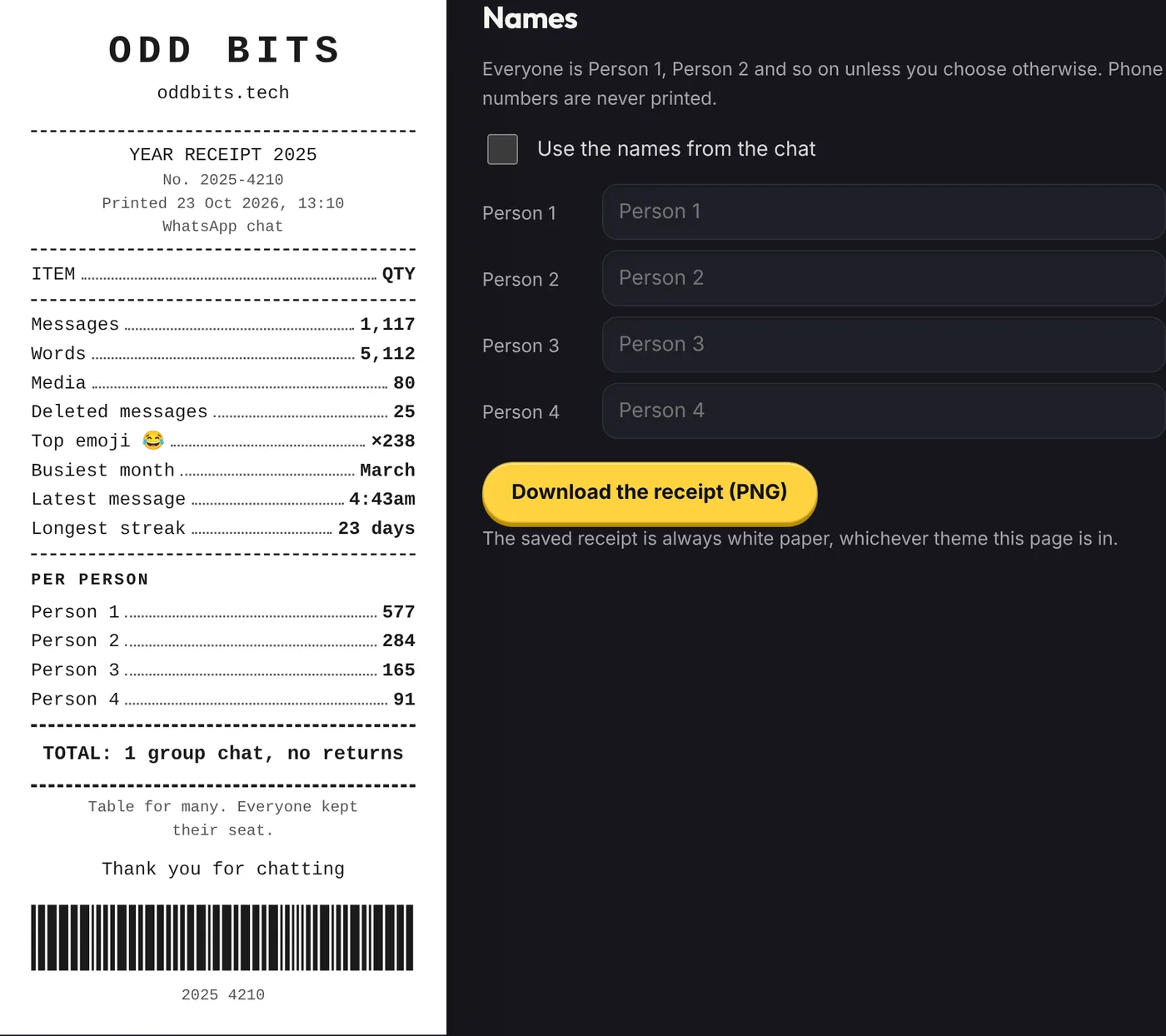
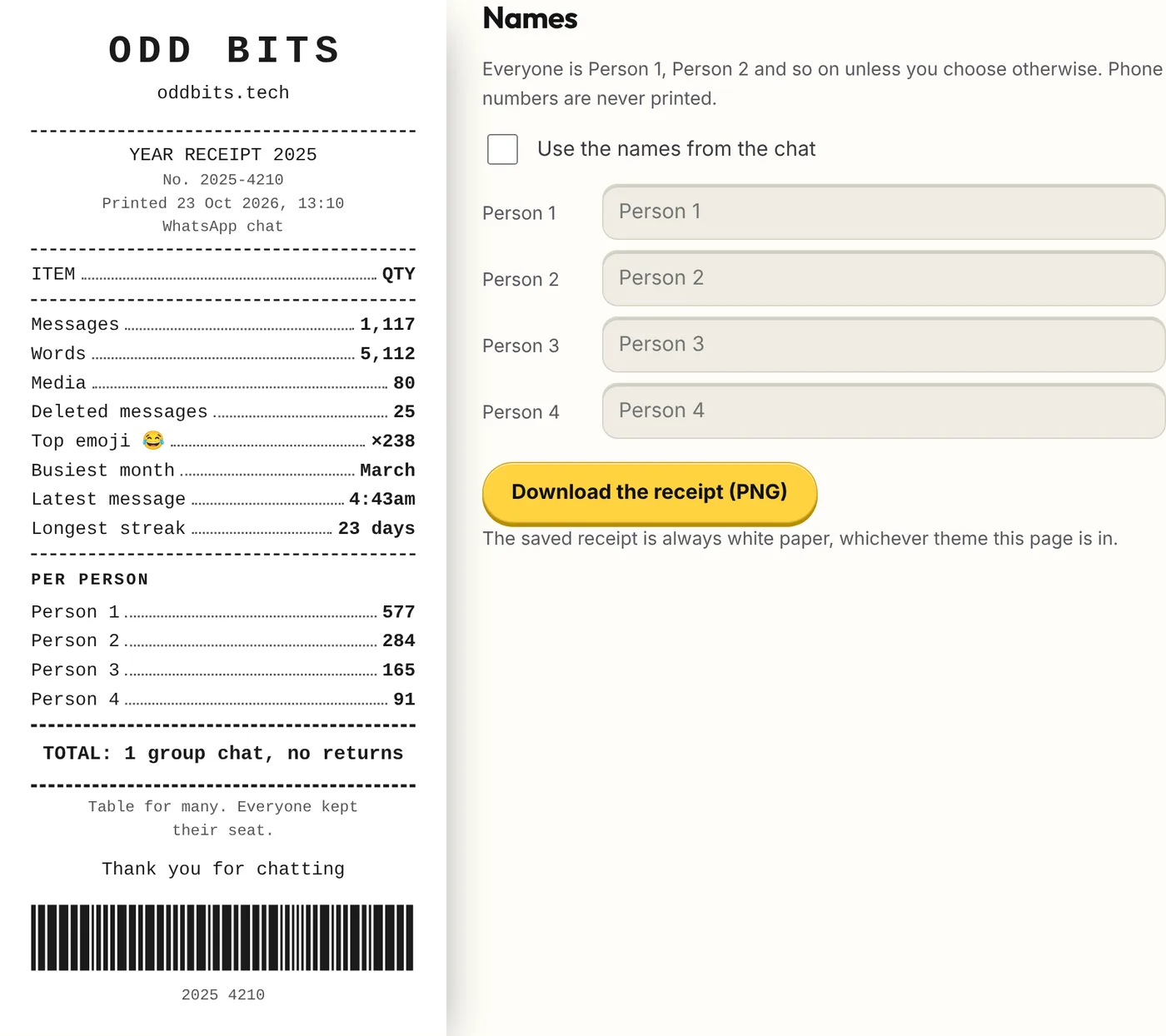
Choose a WhatsApp or Telegram chat export, or a Netflix viewing activity file, and get your year as a shop receipt: messages, words, media, your top emoji, busiest month, how late you were still texting and longest streak, with a total and a thank-you at the bottom. Names are hidden unless you choose to show them. Save it as a tall image, or as a story card.
- What you get
- Your year itemised on a thermal-paper receipt: counts, busiest month, how late you were still texting, streak and a total
- Names hidden as Person 1, Person 2 until you choose otherwise; rename anyone
- A 1080×1920 story card and a tall PNG of the receipt
- Works with
- WhatsApp chat (.txt)Telegram (result.json)Netflix viewing (.csv)
- Version
- v1.0, updated 2026-10-23
What it never does
- Print what anyone wrote. Messages are counted, not quoted: the one thing taken from the text is your most-used emoji. A Netflix receipt prints one title, your most-started show, cut to fit a line
- Print a phone number. A sender shown as a number, or a name with seven or more digits in a row (spaces, dashes and brackets allowed), is printed as Person N, and so is a name you type that looks like a number
- Tell photos from voice notes or videos. A WhatsApp export without media says only that something was omitted, so the receipt says media
- Say you watched anything. Netflix files record when a title was started, not how much of it was watched, so the receipt says started
- Recognise a deleted message in another language. Only the English wording (“This message was deleted”, “You deleted this message”) is counted on the deleted line; any other wording stays in the messages
- Promise the barcode scans. It is a drawing made from the numbers on the receipt and encodes nothing
- Open a .zip. Unzip WhatsApp’s file first and choose the .txt
Questions
How do I export a WhatsApp chat?
In WhatsApp open a chat, tap its name, choose Export chat, then Without media. Choose the .txt file here. A .zip needs unzipping first.
How do I export a Telegram chat?
Telegram’s export is made in Telegram Desktop (the computer app), not the phone app: open a chat, open its menu, choose Export chat history, set the format to JSON and leave media off. Choose result.json here. You can move the file to your phone and use this page there. A full export with many chats lets you pick one.
Which Netflix file do I use?
The viewing activity .csv: either “Download all” on your account’s Viewing Activity page, or ViewingActivity.csv from an account data request. Only English column names are read for now. If the file has several profiles you can pick one.
Where does each line come from?
Messages is every message in the year, media included, except deleted-message notices. Words counts the words in the messages that have text. Media is the messages the export marks as omitted media. Deleted messages is the notices WhatsApp leaves behind, in English only; the line is left out when there are none. Top emoji is the most-used emoji and how many times it appears. Busiest month is the month with the most messages. Longest streak is the most days in a row with at least one message. Titles started, Episodes and Films come from the Netflix rows: a title is an episode when its name looks like “Show: Season 1: Episode 2”, and anything else counts as a film. No line is a score or a percentage.
What is “Latest message”?
The message sent latest in the night, counting a day as running from 5am to 5am, so 3:12am counts as later than 11:30pm. Times are as written in the export, to the whole minute, so an Android and an iPhone export of the same chat agree. Netflix files carry no time of day on the receipt.
Why do some names say Person 1, Person 2?
Names are hidden until you tick “Use the names from the chat”, and you can type a name for anyone, which wins over the name in the file. The five busiest people are listed, in order of messages, and everyone else is added up as Others. A name over 14 characters is cut short with an ellipsis so it fits a line.
How are the total and the joke chosen?
From short fixed lists, by a number worked out from your counts, so the same file always prints the same receipt. Some jokes only come into the list when the counts allow them: a streak of a week or more, a late-night message, a lot of media. The order number is the year and four digits from the same calculation.
What does the print time mean?
It is your device’s clock at the moment you opened the receipt, in the time zone your device is set to. It is not a date from your file.
What do I get when I save it?
“Download the receipt” saves a tall PNG of the receipt on white paper, 1,380 pixels wide, whichever theme the page is in. “For your story” is a 1080×1920 card with the receipt on a plain background and the oddbits.tech mark, then a closing card; share it from the share sheet where your browser has one, or save it and add it to your story from your photos. That box can also make a short silent video of the two cards.
Does it work for big chats?
Yes. The file is read in the background so the page stays responsive, up to 250 MB.
Is it free?
Free. The saved receipt says ODD BITS and oddbits.tech at the top, and the story card carries the same mark.
Not affiliated with, endorsed by or sponsored by WhatsApp, Meta, Telegram or Netflix. They are named only to say which export this reads. No logos or artwork are used.